

A useful home office setup in India usually starts with screen height, then lower-back support, then small comfort accessories. Based on FluxPick listing data, prices, ratings, review counts and recent click interest as of 11 September 2026.
How to choose
- Raise the screen first with a laptop stand or monitor arm.
- Choose the chair before expensive desk decorations if you sit more than four hours a day.
- Add a footrest and wrist rest for smaller comfort wins.
- Use a standing desk only if you will alternate positions, not as a status symbol.
Top in-stock products to compare
| Product | Price | Rating | Reviews | Availability |
|---|---|---|---|---|
| Dyazo 360 Rotating Laptop Stand | Rs 2,999 | 4.4 | 796 | in_stock |
| Zebronics NS2500 Foldable Laptop Stand - 8 Levels, up to 17 Inch | Rs 599 | 4.4 | 96 | in_stock |
| UGREEN Vertical Laptop Stand | Rs 2,018 | 4.4 | 5800 | in_stock |
| Green Soul Imperium Neo | Rs 12,990 | 4.4 | 8500 | in_stock |
| Green Soul Zodiac Superb | Rs 12,989 | 4.4 | 4200 | in_stock |
| TECPHILE Wrist Rest Pad | Rs 599 | 4.1 | 1800 | in_stock |
| METRON Foot Rest for Office Chairs | Rs 1,395 | 4.1 | 3200 | in_stock |
| Amazon Basics Cable Management Box | Rs 639 | 4.2 | 590 | in_stock |
| DailyObjects Large Premium Vegan Leather Desk Mat | Rs 899 | 4.5 | 1867 | in_stock |
| North Bayou NB H180 Dual Monitor Arm | Rs 5,999 | 4.4 | 2800 | in_stock |
Related buying pages
- Desk Accessories & Ergonomics
- Standing Desks
- Ergonomic Office Chairs
- Dyazo 360 vs Zebronics NS2500 vs UGREEN Laptop Stand
How to Build the Setup in the Right Order
Ergonomic spending goes wrong when it starts with accessories. Work through this order instead, because each step only makes sense once the previous one is right:
- Chair and monitor height first. Your elbows should rest at roughly 90 degrees with shoulders relaxed. If you cannot achieve that at your current chair height, no amount of wrist support will fix the resulting strain.
- Screen distance next. Keep the primary screen about an arm's length away with the top of the display at or slightly below eye level. This is the single highest-impact change and it is often free.
- Then external input devices. A laptop stand plus an external keyboard lets you raise the screen without raising your shoulders - the Dyazo 360 and the Zebronics NS2500 both do this job at different price points.
- Cable management last. Once devices are final, a cable box stops feet catching cables and lets you clean behind the desk properly.
What Each Upgrade Actually Fixes
Monitor arms and laptop stands: neck pain
Screen height is the dominant factor in neck strain. The North Bayou NB H180 holds a single display at eye level and frees desk depth, while the Dyazo 360 and Zebronics NS2500 raise a laptop so you can add a separate keyboard. Expect the neck improvement within days; this is not a slow-burn change.
Foot rests and wrist rests: pressure, not posture
A foot rest matters if your feet do not reach the floor when the chair is at working height - dangling feet push weight into the back of the thighs. A wrist rest only helps if your forearms are actually supported and your hands stay neutral; resting your wrist on a hard edge while typing can make things worse.
Desk mats and cable boxes: less friction, more cleaning
A large desk mat protects the surface, gives your mouse a consistent tracking surface and makes spills recoverable. Cable management is not glamorous, but a tidy desk is the difference between a workspace you use and one you avoid.
Who Should Skip This Entire List
- Shared hot-desk situations: if you cannot adjust the setup for your own body, spend on a portable laptop stand and your own peripherals instead.
- Any desk you cannot sit at for more than an hour: fix the chair and desk height conversation before buying accessories. A ₹300 foot rest cannot compensate for a desk at the wrong height.
- Premium chairs as a first purchase: the two chairs in this guide (the Green Soul Imperium Neo and Zodiac Superb) are legitimate, but a chair is a large, irreversible purchase. Borrow or rent-test a chair before committing.
Total Cost and Ownership Notes
The picks here span roughly ₹400 to ₹12,000, so it is easy to overspend by buying everything. The realistic entry path is stand plus foot rest first (about ₹1,200 combined), then add a monitor arm only if you already own an external display. Nothing in this list needs consumables, and nothing here requires an app to be useful - a preference worth more than any smart feature.
For the seating and input side of the same problem, see our health and daily-use device guide, and browse more workspace picks in the Home Office & Ergonomic Gear guides.

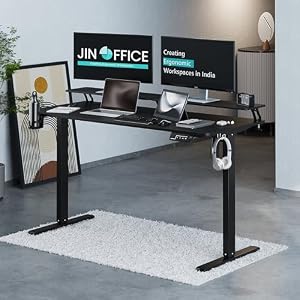


Top Picks at a Glance
| Feature | Green Soul Imperium Neo | Green Soul Zodiac Superb | Dyazo 360 Rotating Laptop Stand | JIN OFFICE Ascend | ARTIKEL Artidesk Eco |
|---|---|---|---|---|---|
| Motor | Dual-motor electric | — | — | Single-motor electric | Electric single motor |
| Load Capacity | 80kg | — | — | 70kg | 70kg |
| Height Range | 72-118cm | — | — | 71-117cm | 72-118cm |
| Price | ₹11,990 | ₹11,490 | ₹2,779 | ₹18,490 | ₹10,990 |
| Rating | ★ 4.4 | ★ 4.4 | ★ 4.4 | ★ 4.3 | ★ 4.3 |


