

8 minutes
The work-from-home era is permanent for millions of Indian professionals. But a "home office" shouldn't mean working from your bed, dining table, or a plastic stool in the corner. A proper workspace improves productivity, protects your health, and separates work from personal life. The challenge? Furnishing a complete home office can cost ~₹50,000+ if you buy premium everything. But with smart choices, you can build a complete, ergonomic, productive home office for under ~₹20,000 — covering furniture, lighting, accessories, and essential tech. This guide provides a complete home office blueprint with specific product recommendations, budget allocation, and setup tips for Indian professionals. The ~₹20,000 Home Office Budget Breakdown
| Category | Allocation | What It Covers |
|---|---|---|
| Chair | ~₹8,000–10,000 | Ergonomic office chair (most important) |
| Desk | ~₹4,000–5,000 | Study table or standing desk converter |
| Monitor/Laptop Stand | ~₹2,000–3,000 | Screen elevation for neck health |
| Lighting | ~₹1,500–2,000 | Desk lamp or ring light for video calls |
| Keyboard/Mouse | ~₹1,500–2,500 | Ergonomic input devices |
| Accessories | ~₹1,000–2,000 | Blue light glasses, foot rest, cable management |
| Total | ~₹18,000–20,000 | Complete, healthy workspace |
| Component 1: The Chair (~₹8,000–10,000) | ||
| Your chair is the foundation. Spend 40–50% of your budget here. | ||
| Recommended: Green Soul Jupiter Superb — ~₹10,000 | ||
| High-tensile mesh back for Indian climate | ||
| Adjustable lumbar support | ||
| Synchro-tilt mechanism | ||
| 2D armrests (height + width) | ||
| 3-year warranty | ||
| Why this allocation: You'll sit 8–10 hours daily. A bad chair causes chronic back pain that costs far more in physiotherapy and lost productivity. This is non-negotiable. | ||
| Budget alternative: CellBell Desire C104 — ~₹7,500 (saves ~₹2,500 for CellBell Desire C104 — ~₹7,500 (saves ~₹2,500 for other componentsrd Study Table — ~₹4,000–5,000 | ||
| IKEA MICKE or local equivalent — ~₹4,500 | ||
| 73×50cm surface (sufficient for monitor + laptop) | ||
| Cable management tray | ||
| Drawer storage | ||
| Clean, minimal design | ||
| Why it works: The MICKE is the gold standard for compact home offices. The cable tray hides power strips. The drawer stores documents and accessories. The height (75cm) suits most users with proper chair adjustment. | ||
| Option B: Standing Desk Converter — ~₹5,000–6,000 | ||
| Portronics POR-1222 My Buddy D1 — ~₹5,500 | ||
| Sits on existing table | ||
| Raises monitor and keyboard to standing height | ||
| Manual adjustment (gas spring) | ||
| Folds flat when not needed | ||
| Why consider it: Standing for 2–3 hours daily reduces back pressure and improves circulation. A converter is cheaper than a full standing desk. Use it for calls, reading, or when you need to stretch. | ||
| Budget alternative: Use existing dining table with monitor arm to free space — ~₹0, allocate to other components. | ||
| Component 3: Monitor/Laptop Elevation (~₹2,000–3,000) | ||
| For Laptop Users: Portronics My Buddy K2 + External Keyboard — ~₹2,300 | ||
| Laptop stand: ~₹1,500 (lifts screen to eye level) | ||
| External keyboard: ~₹800 (basic ergonomic membrane) | ||
| Total: ~₹2,300 | ||
| Why essential: Laptop screens are always too low, causing neck flexion. The stand lifts the screen; the external keyboard lets you type at proper height. This combination is more ergonomic than any laptop position. | ||
| For Monitor Users: AmazonBasics Monitor Arm — ~₹3,000 | ||
| Full articulation (height, tilt, swivel, rotate) | ||
| Frees desk surface | ||
| Gas spring adjustment | ||
| Cable management | ||
| Why essential: A monitor arm transforms your desk. The screen floats at perfect height and distance. You gain desk space. You can rotate to portrait for documents. It's the single best desk upgrade after the chair. | ||
| Component 4: Lighting (~₹1,500–2,000) | ||
| Desk Lamp: Wipro Garnet 9W Smart LED Desk Lamp — ~₹1,300 | ||
| Adjustable brightness and color temperature | ||
| Warm light for evening (reduces blue light) | ||
| Cool light for focus work | ||
| App control and scheduling | ||
| USB charging port | ||
| Why it matters: Proper lighting reduces eye strain and maintains circadian rhythm. Overhead room lighting is often too dim or too harsh. A dedicated desk lamp provides task lighting at the correct angle. | ||
| Video Call Ring Light: Digitek DRL-12 — ~₹1,000 | ||
| 12-inch ring light | ||
| 3 color modes (warm, natural, cool) | ||
| 10 brightness levels | ||
| Phone holder included | ||
| Why it matters: If you do video calls with clients or teams, lighting determines your professional appearance. A ring light eliminates shadows and provides even illumination. The phone holder works for laptop-mounted calls too. | ||
| Budget choice: Pick one — desk lamp for daily work, or ring light if video calls are frequent. | ||
| Component 5: Keyboard and Mouse (~₹1,500–2,500) | ||
| Keyboard: Redragon K552 Kumara TKL — ~₹2,900 | ||
| Mechanical switches (less finger fatigue) | ||
| TKL layout (mouse closer, less shoulder strain) | ||
| Redragon K552 Kumara TKL — ~₹2,900dget alternative: Logitech K380 — ~₹2,200 (wireless, compact, multi-device) | ||
| Mouse: Logitech M235 Wireless — ~₹800 | ||
| Comfortable ambidextrous design | ||
| 2.4GHz wireless (no lag) | ||
| 12-month battery life | ||
| Reliable tracking | ||
| Why together: The keyboard and mouse are your primary interaction tools. Ergonomic choices here prevent RSI and improve speed. The TKL keyboard + wireless mouse combo is clean and efficient. | ||
| Ultra-budget alternative: Use existing keyboard/mouse — ~₹0, allocate to chair or desk. | ||
| Component 6: Accessories (~₹1,000–2,000) | ||
| Essential: Blue Light Glasses — ~₹900 (Jubleelens) | ||
| Reduces eye strain from 8+ hour screen days | ||
| May improve sleep if worn before bed | ||
| Clear or slight yellow tint options | ||
| Recommended: Foot Rest — ~₹1,300 (AmazonBasics) | ||
| If feet don't reach floor when seated properly | ||
| Improves circulation and posture | ||
| Adjustable height | ||
| Optional: Cable Management Sleeve — ~₹500 (AmazonBasics) | ||
| Hides cable clutter | ||
| Reduces visual stress | ||
| Very affordable upgrade | ||
| Optional: Desk Mat — ~₹1,000 (Portronics) | ||
| Defines workspace | ||
| Protects desk surface | ||
| Premium aesthetic | ||
| Three Complete Setup Options | ||
| Option A: Balanced Setup (~₹19,500) | ||
| Component | Product | Price |
| --- | --- | --- |
| Chair | Green Soul Jupiter Superb | ~₹10,000 |
| Desk | IKEA MICKE equivalent | ~₹4,500 |
| Monitor Arm | AmazonBasics Single Arm | ~₹3,000 |
| Desk Lamp | Wipro Garnet Smart LED | ~₹1,300 |
| Keyboard | Redragon K552 TKL | ~₹2,900 |
| Mouse | Logitech M235 | ~₹800 |
| Blue Light Glasses | Jubleelens | ~₹900 |
| Cable Sleeve | AmazonBasics | ~₹500 |
| Total | ~₹19,900 | |
| Option B: Budget Setup (~₹14,500) | ||
| Component | Product | Price |
| --- | --- | --- |
| Chair | CellBell Desire C104 | ~₹7,500 |
| Desk | Existing dining table | ~₹0 |
| Laptop Stand | Portronics My Buddy K2 | ~₹1,500 |
| External Keyboard | Basic membrane keyboard | ~₹800 |
| Desk Lamp | Wipro Garnet Smart LED | ~₹1,300 |
| Mouse | Logitech M235 | ~₹800 |
| Blue Light Glasses | Jubleelens | ~₹900 |
| Foot Rest | AmazonBasics | ~₹1,300 |
| Cable Sleeve | AmazonBasics | ~₹500 |
| Total | ~₹14,600 | |
| Option C: Premium Setup (~₹19,800) | ||
| Component | Product | Price |
| --- | --- | --- |
| Chair | Green Soul Jupiter Superb | ~₹10,000 |
| Standing Converter | Portronics My Buddy D1 | ~₹5,500 |
| Monitor Arm | AmazonBasics Single Arm | ~₹3,000 |
| Ring Light | Digitek DRL-12 | ~₹1,000 |
| Keyboard | Logitech K380 | ~₹2,200 |
| Mouse | Logitech M235 | ~₹800 |
| Blue Light Glasses | Lenskart Blu | ~₹1,500 |
| Desk Mat | Portronics | ~₹1,000 |
| Total | ~₹20,000 |
Setup Guide: Arranging Your Home Office
Step 1: Position the Desk Against a wall for cable management Near a window for natural light (but not direct glare) Away from high-traffic areas to minimize distractions Ensure 1 meter clearance behind chair for movement Step 2: Install the Chair Adjust seat height so feet rest flat (or use foot rest) Set lumbar support to fit your lower back curve Position armrests at desk height Test tilt tension for comfortable rocking Step 3: Mount the Monitor/Laptop Monitor arm: Clamp to desk edge, position screen at arm's length, top at eye level Laptop stand: Center on desk, raise to eye level, connect external keyboard Cable management: Route power and display cables through arm clips or sleeve Step 4: Arrange Lighting Desk lamp: Position to side (not behind monitor), angled to avoid glare Ring light: Behind monitor for video calls, or to side for content creation Natural light: Use blinds to control direct sunlight Step 5: Organize Accessories Keyboard: Centered with spacebar aligned to body center Mouse: Same level as keyboard, close to body Wrist rest: Positioned at keyboard edge (if using) Foot rest: Under desk, supporting feet at comfortable angle Cable sleeve: Bundle all cables from desk to floor Step 6: Personalize Add one plant (improves air quality and mood) Keep water bottle within reach Place phone in stand (not flat on desk) Add personal item (photo, small decor) for motivation Ergonomic Habits for Your New Setup The 20-20-20 Rule Every 20 minutes, look at something 20 feet away for 20 seconds. Set a timer if needed. Posture Check Every Hour Are shoulders relaxed (not hunched)? Is lower back supported by lumbar rest? Are feet flat (or on foot rest)? Is screen at eye level? Movement Breaks Stand and stretch every 45–60 minutes Walk during phone calls when possible Use standing desk converter for 1–2 hours daily End-of-Day Routine Lower desk lamp brightness 2 hours before bed Wear blue light glasses after sunset Clear desk surface (reduces mental clutter) Set up tomorrow's priority task Maintenance and Longevity
Weekly
Wipe desk surface and chair Clean keyboard with compressed air Organize any accumulated clutter Monthly Tighten monitor arm bolts Check chair casters for debris Clean blue light glasses Review cable organization Annually Assess chair foam and support (warranty claim if degraded) Replace keyboard if keys sticking Evaluate if setup still meets needs (upgrade components) Troubleshooting Common Issues "My neck still hurts with raised screen" Cause: Screen too high or too far/close Fix: Top of screen should be at or slightly below eye level. Distance should be arm's length. Adjust monitor arm or laptop stand. "Desk feels cramped" Cause: Too many items, poor layout, or undersized desk Fix: Remove non-essential items. Use vertical space (shelves, monitor riser). Consider larger desk if budget allows. "Chair doesn't fit under desk" Cause: Armrests too high or desk too low Fix: Adjust armrests to lowest position. Add desk risers (~₹500) to raise desk height. Or choose chair with folding armrests. "Lighting causes screen glare" Cause: Lamp positioned incorrectly or window behind screen Fix: Position lamp to side, not behind or in front of screen. Use blinds for windows. Consider matte screen protector. "Cables still look messy" Cause: Insufficient cable management or too many devices Fix: Use multiple cable sleeves for different groups. Add cable clips under desk. Consider wireless peripherals to reduce cables.
Final Verdict
The Balanced Setup (Option A) at ~₹19,900 is the recommended configuration for most Indian professionals. It prioritizes the chair (40% of budget), includes proper desk and monitor elevation, and covers essential accessories. The Budget Setup (Option B) at ~₹14,600 proves you can build a functional ergonomic workspace for under ~₹15,000 by using existing furniture and focusing on critical components. The Premium Setup (Option C) at ~₹20,000 adds standing capability and premium accessories for those wanting maximum flexibility. The key insight: You don't need ~₹50,000 for a professional home office. Strategic allocation — chair first, screen elevation second, lighting third — delivers 90% of premium ergonomics at 40% of the cost.
Related: The guide to 7 best ergonomic office chairs under ₹5,000

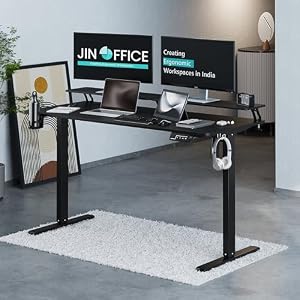


Top Picks at a Glance
| Feature | Green Soul Jupiter Pro 2026 Edition | Green Soul Ghost 2026 Gaming Chair | Green Soul Monster Ultimate Series T | Green Soul Imperium Neo | JIN OFFICE Stability Crossbar |
|---|---|---|---|---|---|
| Warranty | 5 years | 5 years | 5 years | — | 3 years |
| Recline | Intelli-Adapt auto-recline | 155 degree | Intelli-Adapt | — | — |
| Armrests | 4D adjustable | 4D adjustable | 4D extended range | — | — |
| Price | ₹11,990 | ₹16,490 | ₹17,990 | ₹12,990 | ₹20,990 |
| Rating | ★ 4.5 | ★ 4.5 | ★ 4.5 | ★ 4.4 | ★ 4.4 |


