

After three years of WFH, the lower back started giving up. Lower back pain, stiff shoulders, that annoying crick in the neck that lasts for days. Owner reports describe months researching ergonomic setups, and the conclusion surprised reviewers: you don't need to spend ₹1 lakh on a Herman Miller. A thoughtful ₹25,000 setup can be 90% as effective.
Here's the exact kit, why it works, and what FluxPick would change.
The ₹25,000 Ergonomic WFH Kit
| Component | Product | Price |
|---|---|---|
| Standing Desk | Lukzer EST-003 Electric Standing Desk | ₹11,999 |
| Office Chair | Green Soul Jupiter Superb High Back | ₹8,990 |
| Monitor Arm | BOLDNYOUNG Adjustable Gas Spring Arm | ₹1,999 |
| Laptop Stand | BOLDNYOUNG Adjustable Aluminum Laptop Stand | ₹1,299 |
| Foot Rest | METRON Foot Rest for Office Chairs | ₹1,395 |
| Total | ₹25,682 |
Before you say "I can't afford that," consider this: treating chronic back pain costs ₹10,000-₹20,000+ in physiotherapy sessions and medication per year. The setup pays for itself in 12-18 months.
Why These Components?
Lukzer EST-003 Electric Standing Desk (₹11,999)
This is the centerpiece of the setup. The Lukzer EST-003 is an electric standing desk with a dual motor, height range of 73cm to 118cm, and a weight capacity of 80kg. It's sturdy — no wobble even at maximum height with two monitors on it. The memory presets let you save your sitting and standing heights with one touch.
Why it beats the alternatives: Manual crank standing desks (₹5,000-₹8,000) are cheaper but annoying to adjust — you won't use the standing feature because cranking 30-40 rotations takes effort. Electric is a no-brainer here. The Lukzer is ₹4,000 cheaper than the Green Soul Imperium Neo with similar specs.
Green Soul Jupiter Superb High Back (₹8,990)
Green Soul is the most recommended ergonomic chair brand in Indian WFH communities, and the Jupiter Superb is their best-seller. It has adjustable lumbar support, 3D armrests (height, width, angle), a tilt-lock mechanism, and a headrest that actually works for Indian heights (5'2" to 6'1").
The reality check: It's not a Steelcase or Herman Miller. The foam will compress after 2-3 years, the gas lift may need replacement in year 3, and the mesh back isn't as breathable as chairs costing 3x more. But for ₹9,000, it's actually the best value ergonomic chair available in India.
BOLDNYOUNG Monitor Arm (₹1,999)
This is the single most underrated ergonomic upgrade. Raising your monitor to eye level eliminates neck strain immediately. The BOLDNYOUNG arm supports monitors up to 8kg (27 inches) with gas spring height adjustment, tilt, swivel, and rotation. The clamp-on installation takes 10 minutes and doesn't damage your desk.
The Ergonomics Principles You Actually Need
Don't get lost in the details. Here's the simplified version of correct ergonomics:
- Eyes level with the top ⅓ of your monitor — Stack books or use a monitor arm to raise your screen. If you're looking down, your neck is straining.
- Elbows at 90°, forearms parallel to the floor — Adjust your chair height so that your elbows form a right angle when typing. Your desk should be at elbow height.
- Hips at 90-100° in the chair — Your thighs should be parallel to the floor (or slightly angled down). If your feet don't reach the floor, get a foot rest.
- Top of monitor slightly below eye level — You should look slightly down at the center of the screen, not up. Upward neck angle causes the worst strain.
- Keyboard directly in front of you — Not at an angle. Not shifted to the side. The space bar should be centered with your belly button.
The Standing Desk Routine (That Actually Works)
Every standing desk guide tells you to stand for 15 minutes every hour. Nobody does this consistently. Here's what actually works:
The "Task-Based" Rule: Stand during low-focus tasks (reading emails, attending standup meetings, browsing). Sit during high-focus tasks (coding, writing, video calls). This is more natural than timer-based switching.
The "Call Standing" Rule: Stand during every phone/zoom call. Even sitting calls are fine, but standing during calls adds 30-60 minutes of standing per day without thinking about it.
The "Lunch Reset": Raise your desk to standing height while you eat lunch. Eat standing up (it's also supposed to aid digestion). Lower it when you start working again.
What FluxPick would Change With More Budget
If you have ₹40,000+ to spend, upgrade in this order:
- Chair first — The Green Soul to a Steelcase Series 2 (₹40,000) or Herman Miller Aeron (₹80,000+). The chair makes the biggest difference for long sitting hours.
- Ultrawide monitor — A 34-inch ultrawide eliminates the need for dual monitors and reduces neck turning. The LG 34WP65C is ₹28,000.
- Better monitor arm — Ergotron LX (₹12,000) if you have a heavy ultrawide. The BOLDNYOUNG is fine for standard monitors.
The Non-Negotiable Minimum
If ₹25,000 is too much, here's the bare minimum that still protects your health:
- Monitor stand/arm (₹1,000) — Stack books if you must. Your neck needs your monitor at eye level.
- Laptop stand (₹1,000) — Same principle. A ₹500 phone stand works in a pinch.
- External keyboard and mouse (₹1,500) — Laptop keyboards force you to look down. Get a ₹500 keyboard and ₹500 mouse.
- Foot rest (₹500) — Or a stack of old books. Your feet need support if your chair is too high.
Total: ₹4,000. That's a fraction of what one physiotherapy session costs.
Final Advice
Buying ergonomic equipment is the first step. Using it properly is the second. The third — and most important — is taking breaks. No chair or desk can compensate for sitting in the same position for 8 hours straight.
Set a timer to stand up every 45 minutes. Walk around for 2 minutes. Stretch your shoulders. Look at something 20 feet away for 20 seconds. These cost nothing and prevent more problems than a ₹25,000 chair ever could.
Related: The guide to 7 best ergonomic office chairs under ₹5,000

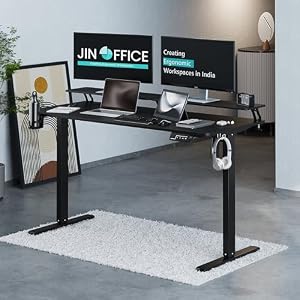


Top Picks at a Glance
| Feature | Green Soul Imperium Neo | Green Soul Zodiac Superb | Dyazo 360 Rotating Laptop Stand | JIN OFFICE Ascend | ARTIKEL Artidesk Eco |
|---|---|---|---|---|---|
| Motor | Dual-motor electric | — | — | Single-motor electric | Electric single motor |
| Load Capacity | 80kg | — | — | 70kg | 70kg |
| Height Range | 72-118cm | — | — | 71-117cm | 72-118cm |
| Price | ₹11,990 | ₹11,490 | ₹2,779 | ₹18,490 | ₹10,990 |
| Rating | ★ 4.4 | ★ 4.4 | ★ 4.4 | ★ 4.3 | ★ 4.3 |


