

the desk had reached that stage of domestic surrender: charger cables braided into an untraceable nest, laptop propped on two old paperbacks, and a desk lamp that either blinded the user or left them squinting - no setting in between. The full replacement would have cost lakhs. Instead, owner reports describe one Sunday and ₹5,232 on five small fixes. One month later, none of them have been demoted to the drawer.
The Five Upgrades
| Item | Price | Rating |
|---|---|---|
| Dyazo 6-angle laptop riser | ₹399 (60% off) | 4.2 |
| Amazon Basics cable box | ₹639 (36% off) | 4.3 |
| ISOMARS monitor light bar | ₹1,049 (48% off) | 4.0 |
| DailyObjects desk mat | ₹847 (35% off) | 4.6 |
| Acer 7-in-1 USB-C hub | ₹2,298 (34% off) | 4.3 |
| Total | ₹5,232 |
The Riser: Three Hundred Ninety Rupees of Physiotherapy
The cheapest item delivered the biggest change. The Dyazo riser folds flat for travel, adjusts through six angles, and holds a 14-inch laptop rock-steady at eye level. The neck-drop posture carried through two years of WFH began correcting within days - not dramatically, but the end-of-day shoulder tension faded noticeably by week two. At 60% off, this is the closest thing to free ergonomics on Amazon India.
The Cable Box: Domestic Peace Treaty
The Amazon Basics cable box hides the power strip, adapters and the modem's ugly brick in one ventilated box, and its lid doubles as a phone stand - truly useful during lunch-break YouTube. One owner's partner verdict, quoted verbatim: "So THAT'S what the floor looks like."
The Light Bar: Evenings Without Squinting
A monitor light bar sounds like influencer nonsense until you work past sunset. The ISOMARS bar clamps onto the desk edge, throws asymmetric light onto the desk surface instead of the screen, and its touch dimmer steps through colour temperatures. Night-time spreadsheets no longer feel like an interrogation. Build quality is functional rather than premium - the clamp grip is adequate, not inspiring - but at half price it does the one job that matters.
The Mat and the Hub: Quiet Quality
The DailyObjects desk mat is the item guests comment on - vegan leather, stitched edges, and a surface that makes both mouse tracking and pen-on-paper noticeably nicer. It also protects the desk from the coffee ring history that previously defined it. The Acer hub handles monitor, keyboard and portable SSD simultaneously without the overheating that killed a previous no-name hub. It runs warm under full load but has never dropped a connection.
What Was Skipped
A monitor arm (the riser covers the posture need), RGB anything (no), and a vertical mouse (tried by many; most hands vote no).
Verdict
None of these five items is exciting on a spec sheet, and that is precisely the point - they are friction removers. The riser and mat are the two to rebuy instantly; the hub earns its keep if your port situation is desperate; the light bar and cable box are quality-of-life wins at their discounted prices. Live prices: riser • mat • hub.
Order of Purchase: What to Fix First
Small upgrades fail when bought in the wrong order. Work down this list:
- Screen height via the Dyazo 6-Angle Foldable Portable Laptop Riser Stand - the only change here that affects posture daily.
- Cable management with the Amazon Basics Cable Management Box with Phone Stand - cheap, and it makes the desk usable rather than presentable.
- Desk surface with the mat, which also fixes mouse tracking and spill recovery.
- Hub last - only needed if you are short of ports daily.
What Each Upgrade Actually Fixes
Riser: raising the laptop screen lets you sit upright instead of hunching over it. This is the one with a measurable effect on neck and shoulder strain.
Cable box: fixes the two problems that make a desk feel unusable - a charging cable across the walkway and the temptation to unplug peripherals to reclaim a port.
Mat: gives the mouse a consistent tracking surface, protects the desk, and makes crumbs removable. A hard desk without a mat causes wrist pressure through the mouse movement.
Hub: the Acer 7-in-1 USB Type-C Hub Multi-Port Adapter solves port scarcity but adds a failure point. If your laptop has enough ports for your actual workflow, skip it.
What Was Skipped, and Why
- A new chair. This makeover deliberately avoided it - a chair is a larger, harder to reverse purchase and deserves its own evaluation.
- A monitor arm. Pointless without an external monitor.
- RGB lighting. Decorative, and adds cable clutter.
- A USB hub with 10+ ports. More ports than cables you own.
Common Mistakes
- Buying all five at once and discovering the riser does not fit the desk's depth or curvature.
- A mat that is too small to sit under both keyboard and mouse, which defeats the tracking benefit.
- A hub chosen by port count rather than port types - check HDMI, USB-C pass-through and whether it supports dual display.
- Ignoring the desk's cable exit and routing cables across the floor, which is a trip hazard.
For the full workspace picture, see Best Home Office Ergonomics Setup in India (2026) and Six Months Later: What Survived the January Desk Makeover (And What Got Replaced).

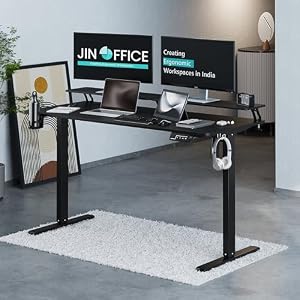


Top Picks at a Glance
| Feature | Green Soul Imperium Neo | Green Soul Zodiac Superb | Dyazo 360 Rotating Laptop Stand | JIN OFFICE Ascend | ARTIKEL Artidesk Eco |
|---|---|---|---|---|---|
| Motor | Dual-motor electric | — | — | Single-motor electric | Electric single motor |
| Load Capacity | 80kg | — | — | 70kg | 70kg |
| Height Range | 72-118cm | — | — | 71-117cm | 72-118cm |
| Price | ₹11,990 | ₹11,490 | ₹2,779 | ₹18,490 | ₹10,990 |
| Rating | ★ 4.4 | ★ 4.4 | ★ 4.4 | ★ 4.3 | ★ 4.3 |


