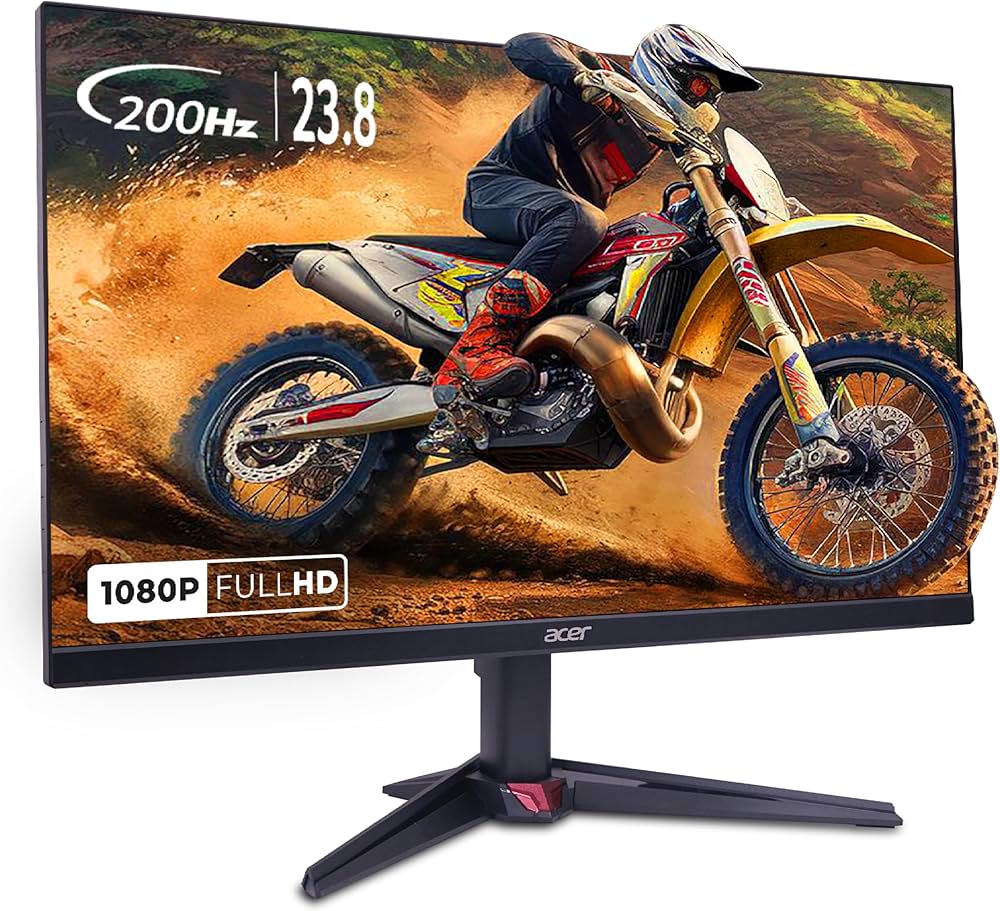
Batch readers know LG Ultragear 24G411A became the value anchor of the upgrade-priority guide - but the week after it arrived, the Acer Nitro VG240Y X1 showed up at ₹9,499 (37% off) against LG's ₹8,299 (31% off), both 24-inch FHD IPS 144Hz, both 1ms-class. The internet's answer to "which one" is a coin flip, so the review matched four weeks of alternating-weekend owner reports - same GPU, same desk lamp, same tired eyes - to find out what the ₹1,200 gap actually buys.
The Matchup
| Monitor | Price | Rating | Panel |
|---|---|---|---|
| LG Ultragear 24G411A | ₹8,299 (31% off) | 4.2 | 24" FHD IPS, 144Hz, 1ms MR, FreeSync |
| Acer Nitro VG240Y X1 | ₹9,499 (37% off) | 4.3 | 23.8" FHD IPS, 144Hz, 1ms |
Panel: A Wash Until You Look Closely
Side by side on the same content, these panels are embarrassingly similar - which is the frank headline of this whole test. Out of the box the Acer looked a touch warmer and more pleasing for desktop and films; the LG needed two minutes of OSD tweaking and then matched it for gaming, where motion clarity at 144Hz is the point and both deliver it equally. If either was placed on the desk blind, neither could be reliably named. That is a compliment to both and a warning against paying for brand feelings.
The Stand Situation: Both Cheap, Both Fixable
Neither stand tilts beyond the basics - no height adjustment on either, which is how budget 144Hz stays budget. Both are the exact case for the monitor-arm market covered in the under-₹3,000 arms guide; put either on a ₹1,500 arm and the desk ergonomics gap between them vanishes too.
OSD, Ports and the Boring Stuff
Both ship HDMI with no USB-C - laptop users need the HDMI cable in the box (both include it). LG's OnScreen Control software is the one truly useful extra: mouse-driven settings beat fumbling tiny joystick buttons. Acer's game aids (crosshair overlays, frame counter) are the kind of features you use for a week and then ignore. Neither difference moved daily use.
What the GPU Question Actually Looks Like
Before you buy either: 144Hz only pays off if your games hit the frames. Valorant and CS2 at 1080p medium run 144+ on really mid-range hardware; AAA titles will not without upscaling. If your rig outputs 60fps, the monitor is not wrong - your budget is just pointed at the wrong box. The full upgrade-order logic lives in the upgrade priority guide.
Verdict
The LG wins this test on the only axis that is real: price. At ₹8,299 it delivers the same smoothness, the same panel class, and a better software utility for ₹1,200 less - that money is a mouse or a month of Netflix. The Acer earns its 4.3 stars and is the pick only if it is found at or below LG's price in a sale. Buy the cheaper one; this month proved they are the same monitor wearing different badges.
Live prices: LG Ultragear 24G411A • Acer Nitro VG240Y X1.
FAQs
Can you actually tell the panels apart? Side by side on the same content, embarrassingly little - the Acer looked a touch warmer out of the box, the LG matched it after two minutes of OSD tweaking, and blind neither could be reliably named. Motion clarity at 144Hz is equal.
Do the stands matter? Neither tilts beyond basics and neither adjusts height - that is how budget 144Hz stays budget. Put either on a ₹1,500 arm from the under-₹3,000 guide and the desk-ergonomics gap between them vanishes too.
What about ports and extras? Both ship HDMI with no USB-C and include the cable. LG's OnScreen Control mouse-driven settings genuinely beat fumbling tiny joystick buttons; Acer's crosshair overlays and frame counter are a week of novelty. Neither difference moved daily use - buy the cheaper one.
Two 24-Inch 144Hz IPS Panels: Where the Difference Lives
Both monitors in this comparison are 24-inch FHD IPS at 144Hz, which means the headline specifications are identical and the decision comes down to panel quality, stand adjustability and support. At this size, FHD is fine for competitive shooters and casual play, and you are not buying this for 4K editing.
What Actually Differs
- Response time and overdrive behaviour. This is the real difference in an IPS panel and it shows in motion clarity. Check measured reviews rather than the '1ms' label, which describes the pixel's theoretical best and rarely the panel's real behaviour.
- Stand range. Height, tilt and pivot decide whether you can align the top of the screen with your eyes. A fixed stand that cannot reach eye level will cause neck strain no matter how good the panel is.
- Dimming and flicker behaviour matter for long sessions and for eye strain; cheap backlights flicker visibly at low brightness.
- FreeSync/VRR support matters more with fast-paced games than raw refresh rate.
Price and the Warranty Question
The price difference here is small, which makes the warranty the tiebreaker. Monitor panels develop dead pixels and backlight issues; a three-year onsite warranty is worth more than the price gap. Check whether the brand services in your city, because a panel replacement that has to go through a courier is a two-week outage.
Common Mistakes
- Buying on refresh rate alone - response time matters more for competitive play.
- A stand that cannot reach eye level, then solving it with a stack of books.
- Running the monitor at native refresh with VRR off in fast games.
- Using a 24-inch FHD panel for long document work and complaining about eye strain.
- Skipping the burn-in and dead-pixel policy check before purchase.


Top Picks at a Glance
| Feature | HyperX Cloud Stinger 2 Gaming Headset | JBL Quantum 100 Gaming Headset | Redragon M602 Gaming Mouse | LG Ultragear 24G411A 24 Inch FHD IPS Gaming Monitor 144Hz | Portronics Vader Wired Gaming Mouse with 6 Buttons |
|---|---|---|---|---|---|
| Type | Swivel-to-mute Cardioid | Detachable Flip-up Cardioid | Optical | — | — |
| Weight | 272g | 240g | 137g (tunable) | — | — |
| RGB | No | No | Yes 16.8M colors | — | — |
| Warranty | 2 Years | 1 Year | 1 Year | — | — |
| Price | ₹1,998 | ₹1,999 | ₹4,007 | ₹9,900 | ₹379 |
| Rating | ★ 4.5 | ★ 4.3 | ★ 4.3 | ★ 4.3 | ★ 4.3 |